Sunrun
- 3.6
- Rating
- 100.00K
- Installs
- Free
- Price

 Analysis by App-foxy
I spent time with Sunrun as a home-energy companion rather than treating it like a general smart-home dashboard. That distinction matters. This is a focused app for people who already use Sunrun services, giving them a place to monitor their systems, handle bills, and reach support. If you are comparing it with broad home-automation apps, you may find its scope narrow, but that narrow focus is also its main advantage: it keeps the most relevant Sunrun tasks together instead of making customers search through separate channels.
The app sits in the House & Home category and is developed by Sunrun, Inc. It is free to install, carries an Everyone content rating, and has reached over one hundred thousand installs. Its average rating is 4.0 from around one thousand ratings, with more than five hundred written reviews. Those figures suggest a generally positive reception with enough mixed experience to remind me that convenience can depend on the user’s Sunrun setup and how much they expect from a mobile account tool.
How Sunrun fits into everyday home-energy management
The clearest way to understand Sunrun is as a customer portal designed for a phone. Instead of opening a browser, looking for account pages, or contacting support for every small question, a customer can use one app to check the system, manage payment-related tasks, and ask for help. That combination makes sense because these jobs are connected: a homeowner may want to check system information, notice an issue, review an account matter, and then contact the company without leaving the same environment.
You May Also Like

 Blood Strike: 2.5 Anniversary
Blood Strike’s Loadouts Turn Every Drop Into a Tactical Gamble
A close look at Blood Strike’s custom loadouts: how fast access to signature weapons reshapes its battle royale rhythm, rewards preparation, and narrows the gap between fights.

 Pandora - Music & Podcasts
Pandora’s Music Is Easy to Start, but Harder to Recover
Pandora’s strength is its low-effort path from a seed to a station. Its weak spot is how much confidence it asks you to place in connection, setup, and quiet recovery.

 8 Ball Pool
 Is Built on Rivalries, Rematches, and Routine
A close look at the rivalries, rematches, shared routines, and unanswered safety questions that turn a quick pool match into a persistent mobile community.

 Samsung Music
’s Quiet Strength Is Playing What You Already Own
Its reach comes less from spectacle than from dependable access to a personal library. That simplicity is both the app’s strongest retention engine and its ceiling.

 AccuWeather: Weather Radar
AccuWeather Review: A Quick, Clear Forecast for Everyday Decisions
For everyday plans, the best forecast is the one you can understand quickly. AccuWeather makes rain timing, radar, and local conditions easy to act on, with a few trade-offs.

 Hill Climb Racing
Why Hill Climb Racing Still Turns Crashes Into One More Run
A tiny car, a bumpy hill and one more upgrade: Hill Climb Racing keeps resurfacing because its simple chaos makes every near-miss feel personal.
More From Our News Desk
View All News


I would not describe it as a replacement for every energy tool in the home. It is not the kind of app I would choose for comparing electricity plans, controlling unrelated appliances, or building a complete household automation routine. Its usefulness comes from being tied to Sunrun service. If you are not a Sunrun customer, the app is unlikely to offer meaningful value, even though downloading it costs nothing.
That customer-only focus also shapes the first-use experience. The important question is not simply whether the app installs smoothly, but whether your account and system details appear correctly after signing in. A person considering it should have their Sunrun account information ready and should expect the app to be most useful once the correct customer profile is connected. This is a practical point that is easy to miss when looking only at a short store description.
Monitoring is useful when you need context, not constant entertainment
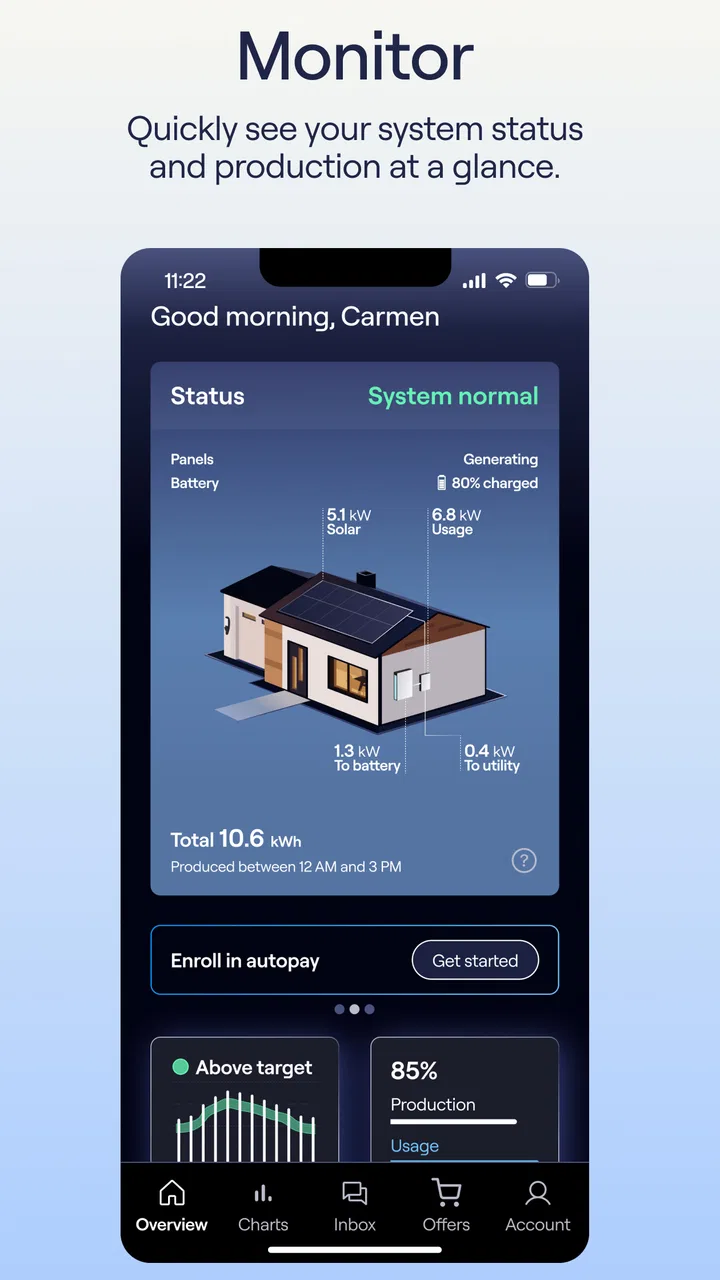
The monitoring side is valuable because it gives the homeowner a more direct view of the system than a paper bill or a generic utility account. I found the concept most helpful when I wanted to check the state of the home-energy setup without turning the task into a research project. A quick look can be reassuring when everything appears normal, while an unexpected result gives me a reason to investigate or contact support.
There is a subtle trade-off here. Monitoring information is only useful if I understand what I am looking at and remember that a single glance does not explain every change in household energy use. Weather, appliance habits, household occupancy, and utility conditions can all affect what a homeowner notices. I would use the app as an early visibility tool, not as the sole basis for making technical conclusions about the system.
That makes Sunrun particularly practical for routine checks. For example, after returning from a weekend away, I might open the app to review the system rather than waiting for the next bill to see whether anything seems unusual. If the result looks concerning, the support route is already nearby. The real benefit is not just the monitoring screen by itself; it is the shorter path from observation to action.
Bill management is a convenience feature with real everyday value
The payment function is another reason an existing customer may keep the app installed. Bills are easy to forget when they are handled through scattered emails, browser bookmarks, or different payment reminders. Having account and payment tasks in the same mobile space reduces that friction. I especially see the appeal for someone who manages household expenses from a phone and wants the energy account available alongside other regular obligations.
Still, I would not install it solely because it is free. Free access is meaningful only when it saves time or makes an existing Sunrun responsibility easier. The app itself has no listed purchase price, but that does not turn Sunrun service into a free product. The app is a customer tool, not a substitute for the underlying home-energy agreement or any charges connected with that service. That distinction is important when judging value: the software costs nothing to download, while the financial relationship it helps manage is a separate matter.
My practical advice is to use the app as one part of a payment routine rather than relying on memory. Check the account when you receive a reminder, confirm that the relevant bill information is visible, and keep your usual financial records as a backup. The app can make access easier, but any important payment habit should still be supported by the reminders or account controls you already trust.
Support is strongest when the issue is connected to the account
The support feature gives Sunrun a useful advantage over a standalone monitoring display. If I notice something that needs attention, I do not have to start from a blank search engine page and work out which department to contact. The app gives the customer a more direct starting point for assistance, which can be especially helpful when the problem involves the home system or the account rather than a general technical question.
That does not mean every issue will be solved instantly inside the app. Support tools are still dependent on the customer’s situation, the clarity of the problem, and the response process behind the service. I would use the app to report or clarify an issue, but I would not assume that a mobile interface can replace all forms of technical help. A physical system problem may still require steps outside the phone.
A useful workflow is to check the monitoring information before contacting support and note what you observed. Even a simple description of when the issue appeared, whether it is ongoing, and what the app shows can make the conversation more productive. This is one of the app’s less obvious strengths: it can help organize the first part of a support request, not merely provide a button that says to ask for help.
Where the app feels better than the usual alternatives
The usual alternative is a web browser, a saved customer-service number, paper correspondence, or a collection of separate utility and payment tools. Those options can work, but they divide the experience. A browser may provide more room for account details, while a phone app is more convenient for a quick check. A phone call can be better when the situation is complicated, but it takes more effort for a basic account question.
Sunrun’s advantage is therefore not that it replaces every alternative. It is that it puts three customer needs—system visibility, bill handling, and support access—under one Sunrun-specific roof. I would choose it over repeatedly navigating a browser for routine tasks. I would choose a broader home-energy or smart-home application only when I needed information or controls that went beyond the Sunrun relationship.
There is also a privacy and account-management trade-off that comes with any customer portal: convenience depends on staying signed in or signing in when needed, and the app becomes less useful if the wrong account is connected. I would be careful when using it on a shared device and would verify that the displayed customer details belong to the intended household before acting on payment or support information.
Small habits that make the app more useful
My first tip is to treat monitoring as a pattern-checking tool. Rather than opening the app repeatedly without a purpose, use it at sensible moments: after a period away from home, after noticing an unusual household-energy situation, or when preparing to contact support. This keeps the information useful and avoids turning normal variation into unnecessary worry.
My second tip is to separate three questions when reviewing the app: is the system visible, is the account in order, and do I need assistance? Keeping those questions distinct prevents a payment concern from being confused with a system concern. It also makes the support conversation clearer if the answer to the third question is yes.
My third tip is to keep the app updated when possible. The current version is 3.0.0, and the app was released on May 16, 2023. I would not assume that every phone experience will be identical, but staying on the available version is a sensible way to avoid problems caused by an outdated installation. The minimum operating-system requirement is Android 7.0, so people using older Android devices should check compatibility before planning around it.
One more useful habit is to avoid judging the entire service from a single screen. If monitoring looks unexpected, check the surrounding account context and then use support when the situation remains unclear. Conversely, if the system view is normal but the bill or account information needs attention, handle that as an account task rather than treating it as a system failure. The app becomes more valuable when I use each section for the problem it is designed to address.
Who will get the most value from Sunrun
The best fit is an active Sunrun customer who wants a convenient mobile route to routine account tasks. I would recommend it to homeowners who regularly check their system, prefer phone-based bill management, or dislike searching for support details when something looks wrong. It is also a reasonable choice for households where more than one person needs visibility into the account, provided the account is handled carefully and the right customer profile is used.
The app may also help someone who is not technically confident. Its value is not that it explains every energy concept in depth, but that it gives the customer a clear place to begin. A person can look at the system, review the account, and move toward support without assembling a toolkit of unrelated apps and websites. That reduction in uncertainty can matter more than advanced controls.
I would be less enthusiastic for a user who wants detailed independent energy analysis, extensive controls for devices from different brands, or a complete household dashboard. Sunrun is not the right choice for someone who has no Sunrun relationship, either. In that case, a utility app, solar-monitoring platform tied to the actual equipment, or a general smart-home app may be more relevant.
It is also not ideal for someone who prefers doing everything by phone or in person. The app can provide a convenient digital starting point, but users with complicated billing disputes or technical situations may still prefer direct human assistance. The sensible approach is to see Sunrun as an additional channel, not a promise that every customer need can be completed inside the app.
What the rating and free access really tell me
A 4.0 average indicates that many users find the app useful, while the written feedback count shows that experiences are not completely uniform. I read that as a fair signal for a service companion: it is likely to be valuable when the account connection and routine tasks work as expected, but frustrations can appear when a customer is trying to resolve something more complicated.
The free price makes trying it low-risk from an app-download perspective. There is no separate purchase decision for the software itself, so the value question is straightforward: does it make your existing Sunrun relationship easier to manage? If yes, even occasional use can justify keeping it. If you are looking for a new energy service, the absence of an app charge should not be mistaken for an absence of service costs.
The Everyone rating also makes it broadly suitable from a content standpoint, but that does not mean every household member should automatically have unrestricted access to account and payment information. I would still use normal device security and account judgment, especially on a shared phone or tablet.
My buy-or-skip verdict
Sunrun is worth installing for current customers who want one practical mobile place for monitoring, bills, and support. I like its focused purpose, and I think the strongest value comes from the connection between those functions. Seeing a system concern and having a support route nearby is more useful than having a monitoring screen isolated from the rest of the account. The free download removes the usual app-purchase barrier, making it easy to test whether it fits your routine.
I would skip it if you are not a Sunrun customer, or if your main goal is broad smart-home control and deep energy analysis. I would also avoid depending on it alone for complicated technical or financial matters. In those situations, a browser, a broader monitoring solution, or direct support may be the better tool.
For the right audience, though, this is a sensible House & Home app rather than an unnecessary extra. My recommendation is to install it, connect the correct customer account, use monitoring for purposeful checks, and keep payment and support habits organized around the information it provides. If those three tasks are already part of your life with Sunrun, the app earns its place on your phone.
FAQs for Sunrun
01What is Sunrun and what does it offer?
Sunrun is a solar energy provider that offers residential solar panel installations, battery storage, and energy services. It aims to provide sustainable energy solutions to homeowners, reducing electricity costs and environmental impact. Sunrun offers flexible financing options, including leasing and purchasing plans, to cater to different customer needs.
02How does Sunrun's solar panel installation process work?
Sunrun's installation process begins with a consultation to assess your energy needs and home suitability. After designing a custom solar system, Sunrun handles permits and installation. Once installed, Sunrun monitors the system's performance, ensuring efficient energy production. The entire process is streamlined to minimize inconvenience for homeowners.
03What financing options does Sunrun provide for solar panels?
Sunrun offers various financing options, including solar leases, power purchase agreements (PPAs), and outright purchases. With leasing and PPAs, you typically pay a monthly fee for using the solar system, often with little to no upfront cost. Purchasing involves an upfront payment, allowing you to own the system and benefit from tax incentives.
04What is the difference between leasing and purchasing solar panels with Sunrun?
Leasing solar panels through Sunrun means you pay a fixed monthly fee for using the system without owning it. This option often requires no upfront payment. Purchasing involves buying the solar system outright, giving you ownership and eligibility for tax credits. Each option has unique benefits, depending on your financial situation.
05Does Sunrun offer any warranties or maintenance services for their solar systems?
Yes, Sunrun provides comprehensive warranties and maintenance services for its solar systems. The warranties typically cover equipment, performance, and installation. Additionally, Sunrun offers monitoring services to ensure optimal system performance and includes maintenance to address any issues, providing peace of mind to homeowners.
Pros
- Intuitive and user-friendly interface.
- Efficient energy usage tracking.
- Customizable alert settings.
- Seamless integration with smart devices.
- Comprehensive customer support.
Cons
- Limited offline functionality.
- Occasional sync delays.
- High battery consumption.
- Requires stable internet connection.
- Premium features are costly.

Sunrun
Gallery